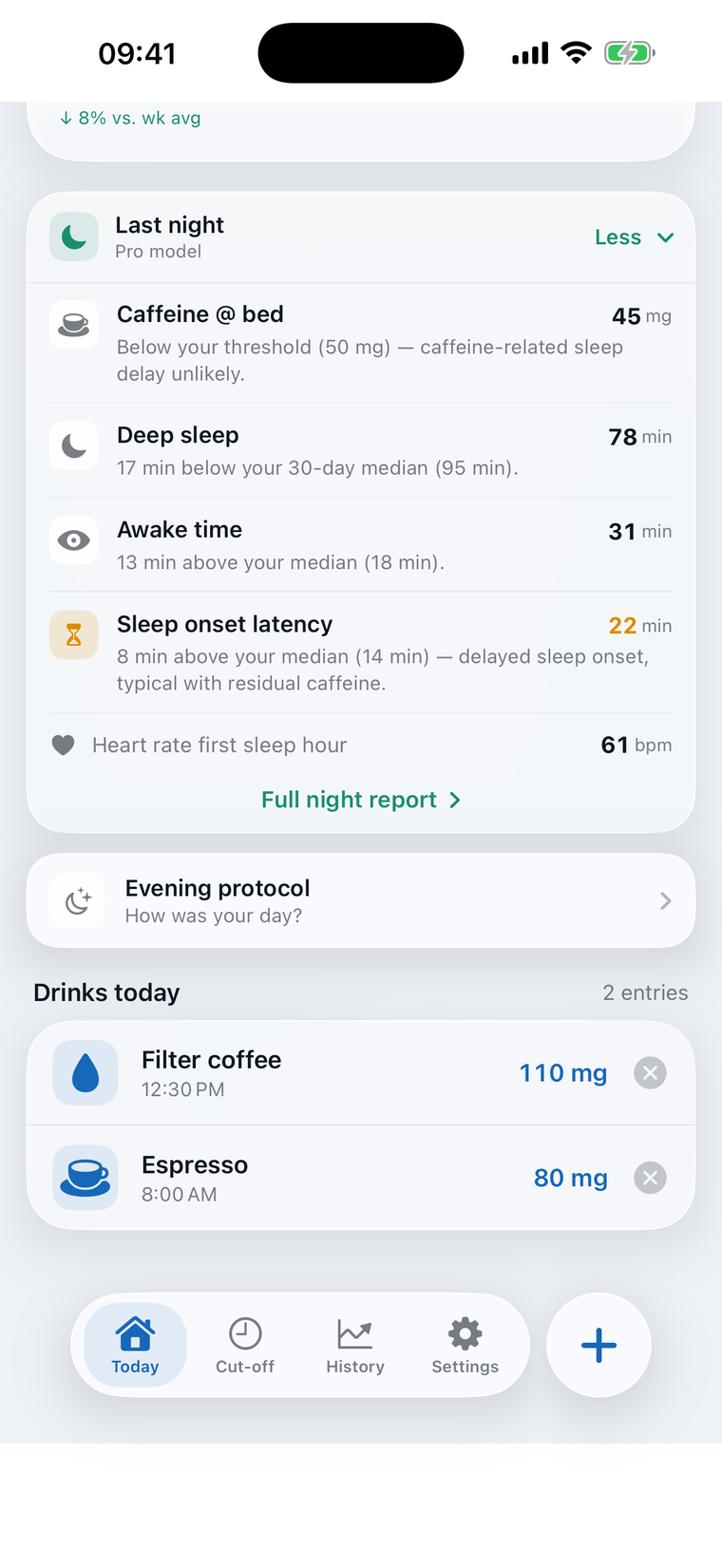
Halvo works out how much caffeine is active in you right now and how much of it will still be there at bedtime. That gives you your cut-off: the time after which another cup would disturb your sleep.
Every cup feeds into the curve, and the curve gives you your cut-off.
Log coffee, espresso, tea, energy drinks, mate or cola with two or three taps, straight from the widget if you like. Halvo converts every drink into the caffeine it delivers and adds it to your daily total.
Halvo uses the Bateman function, pharmacology's standard model for how a substance enters the bloodstream and is cleared again. Instead of blanket rules of thumb — „no coffee after 2pm!“ — you get a curve: how much caffeine is working in your body right now, and how the level falls towards the evening.
Halvo calculates your caffeine cut-off: the time up to which you can still have a coffee without the caffeine being able to disturb your sleep. Whether it actually does disturb it is something Halvo Pro measures, using several biomarkers from your smartwatch.
Two days with the same coffees in the morning and at lunch; on one of them a cup is added at half past four. At bedtime, 79 milligrams are still working instead of 39. The difference comes from that single cup. Whether that cup is already a problem for your sleep is something you can finally see the next morning — or track with Halvo Pro through your biomarkers.
Halvo draws a clear curve of how much caffeine is still in your blood and when — and shows you exactly how late a last coffee, cola, mate or energy drink will almost certainly not disturb your sleep. In the free version Halvo uses population averages; in Pro it gets better at pinning down your personal cut-off with every day.

Of the cup at half past four, around 40 milligrams are still working at eleven.
No more coffee after four? That is nonsense: it depends not only on how many coffees you had before — but also on how fast your body clears caffeine, and that varies enormously. The average value Halvo starts with rarely fits exactly. Pro reconciles it with your sleep data, night after night.
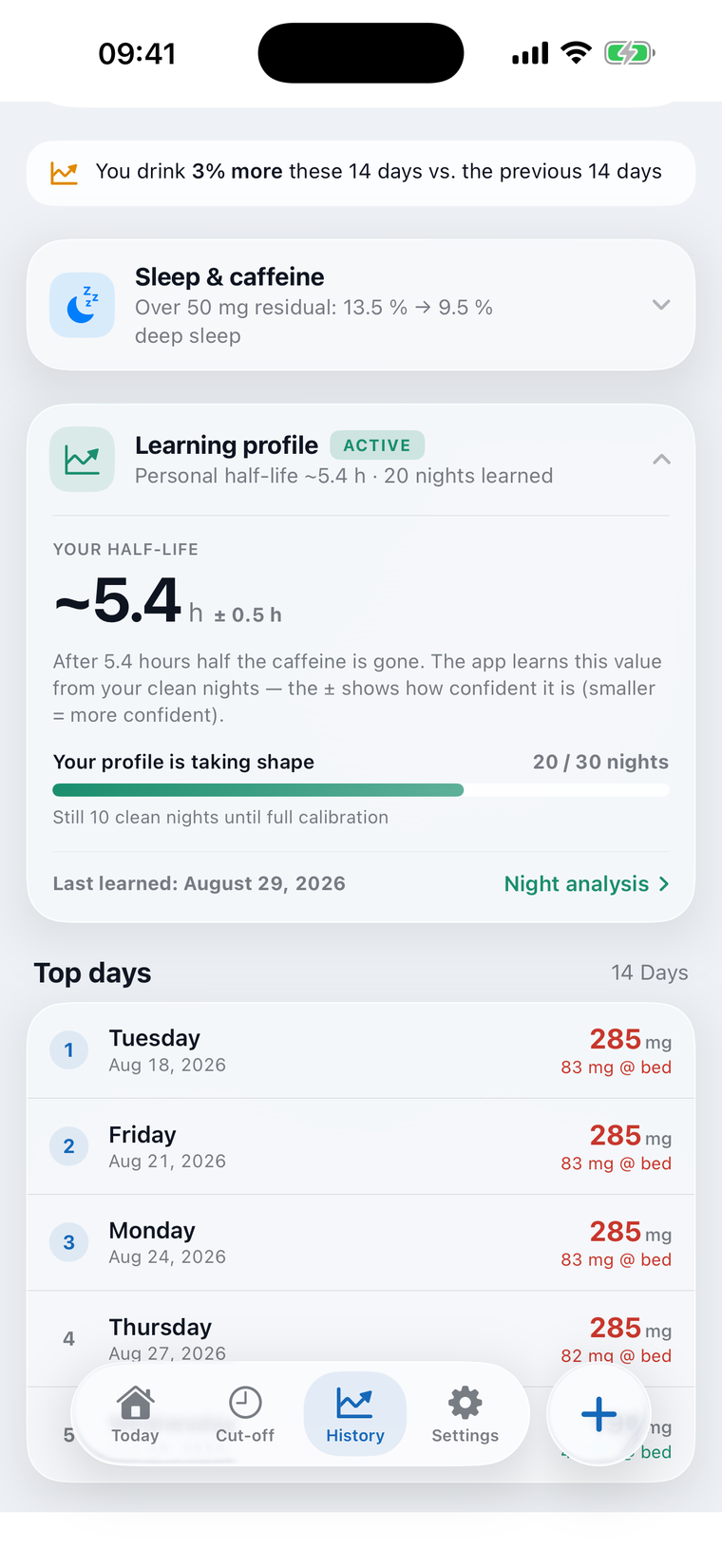
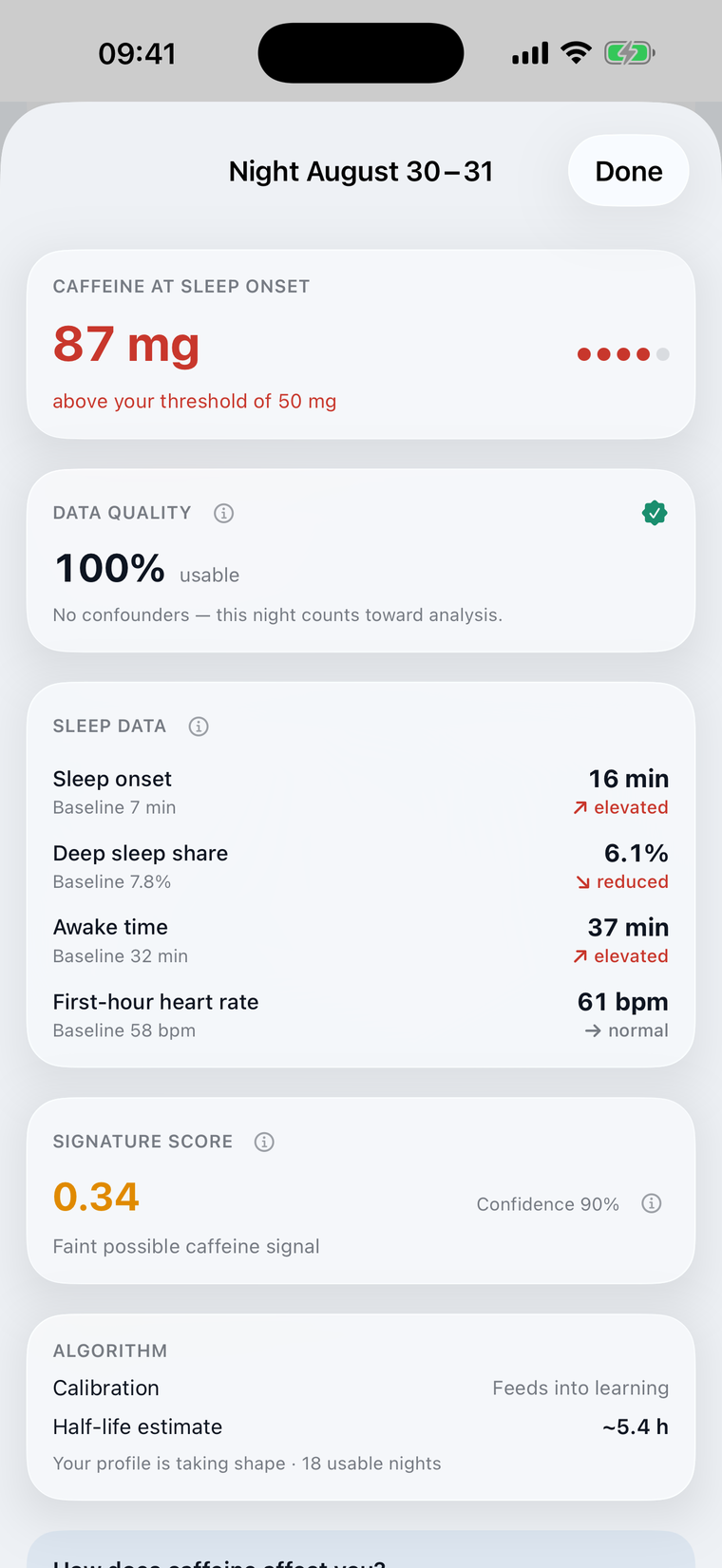
There is no shortage of sleep apps — but Halvo relates the relevant sleep data to your caffeine intake. The night report shows how much caffeine was still working at bedtime by the model's reckoning, how the night compared with your usual ones, and whether its data is good enough to learn anything from at all.
Nights with alcohol, late exercise or illness don't count towards the learning. You note them in the evening log, and tracked workouts Halvo even picks up automatically: the night report then states that the night was skipped, and why.
The values in the model come from published research — including the two findings that don't flatter the product: caffeine's effects on sleep are small, and watches measure them imprecisely. Three examples.
That is how long before bedtime an ordinary cup of coffee would have to be drunk if you wanted to rule out an effect on sleep with confidence — the result of a meta-analysis across 24 studies in which caffeine shortened sleep by 35 minutes on average, across all doses. But that is only the average: for you it could just as well be 5 hours or 15.
Gardiner et al. (2023), Sleep Medicine ReviewsThat is the spread of caffeine half-life between people. Smokers clear caffeine roughly twice as fast; on the pill it takes roughly twice as long. Halvo asks about both in your profile and works the rest out from your nights in Pro.
Review of caffeine pharmacokinetics and CYP1A2, PMC11555877Your sleep app tells you exactly how well you slept? It is only estimating: out of 100 minutes of deep sleep, an Apple Watch recognises 62 as deep sleep; the rest it usually takes for light sleep, and other trackers aren't perfect at this either. So Halvo leans on what watches do measure reliably: waking periods, night-time heart rate and, where the watch provides it, how long you took to fall asleep.
Apple, Estimating Sleep Stages from Apple Watch (Oct. 2025)Logging, the curve, the widget and the cut-off stay free for good. You don't need an account for any of it.
The yearly plan starts with a free month and then renews at €24.99 unless you cancel before it ends. Monthly, Pro costs €3.99. Payment goes through your Apple account and you can cancel any time in your Apple account settings. Prices may vary by region.
Missing one? Write to support@jnmcloud.de — every mail is read and answered.
Halvo reads your sleep and heart data through Apple Health. Make sure your wearable syncs with Apple Health, and allow Halvo access when the app asks — or under Settings → Health → Data Access & Devices → Halvo. The app never connects to those services directly; it only reads what is already in Apple Health.
The Pro model uses your sleep data — sleep stages, heart rate and heart rate variability — to learn how caffeine affects your nights. Without Health access the app still logs caffeine and gives you your cut-off, but the personal learning and the sleep insights stay switched off. You decide which data the app may read.
After every clean night — no alcohol, no late exercise, no illness — the app compares how badly it expected your sleep to be disturbed by the day's caffeine with what your watch actually measured. Depending on the gap, it shifts the half-life it uses for you a little in the appropriate direction. After around 30 clean nights it usually has enough data either to name a reliable value or to tell you that your data doesn't support one. You can see where it stands in the learning profile.
Then Halvo says exactly that. Caffeine's effects on sleep are real but small, and sleep trackers measure imprecisely. For some people that isn't enough for a reliable estimate. In that case the app shows „no measurable effect“ and carries on with the average value of about five hours' half-life. It does not claim an accuracy the data cannot support.
Yes. Your health and consumption data are processed on your device and never sent to a server of ours. Your settings and evening notes sync through your own private iCloud so they survive a reinstall. Halvo does not sell your data. Details in the privacy policy.
Subscriptions are managed by Apple. On your iPhone open Settings → tap your name → Subscriptions → Halvo. There you can switch or cancel. The Lifetime option is a one-off purchase with no recurring cost.
Open the Pro page in Halvo and tap „Restore Purchases“. Make sure you are signed in with the same Apple ID you bought it with.
Press information with a fact sheet, the research, screenshots and boilerplate. TestFlight access and background conversations are available on request — including on the limits of the model.
 Halvo
Halvo

